Day: April 19, 2022

  • How to Create Effective STEM Presentation Materials

    How to Create Effective STEM Presentation Materials

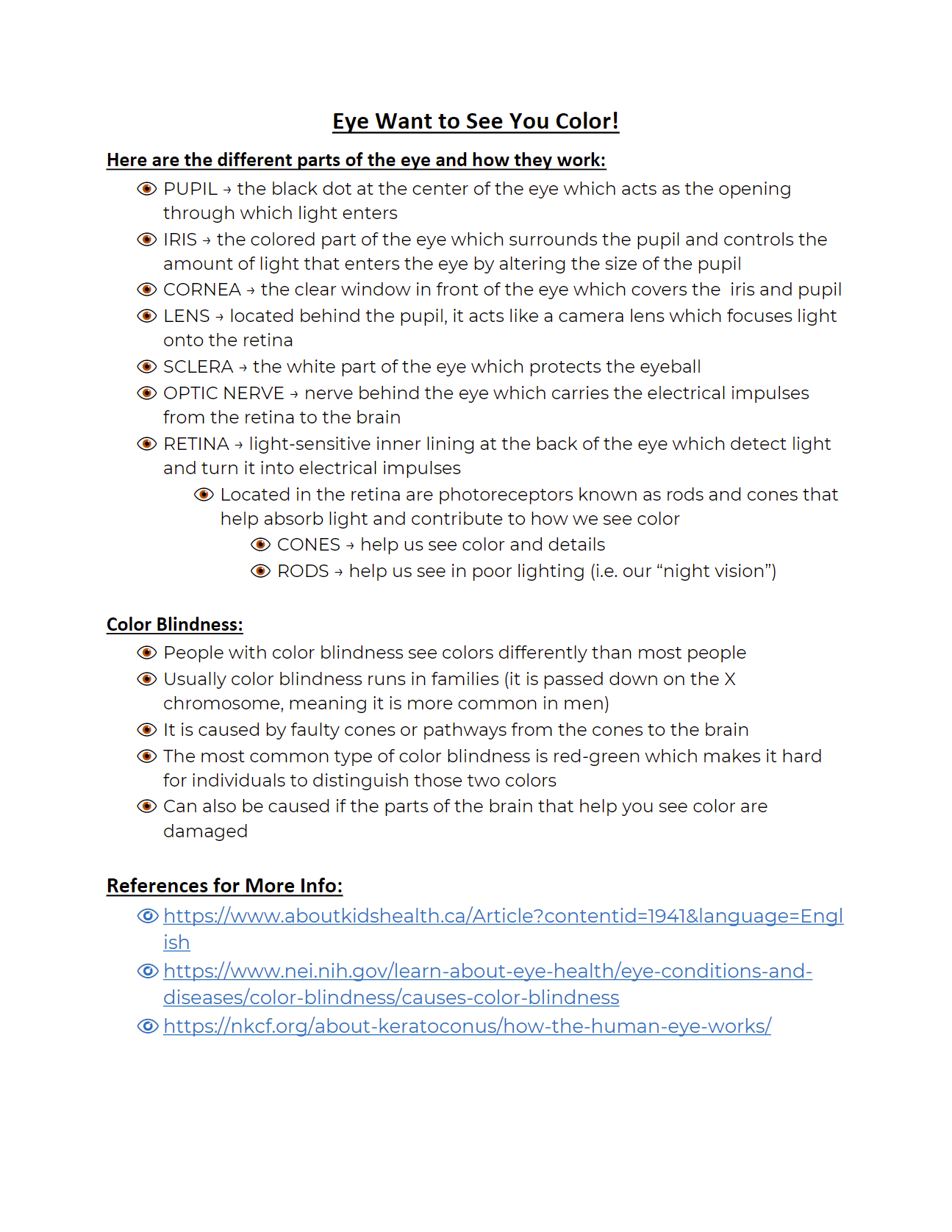
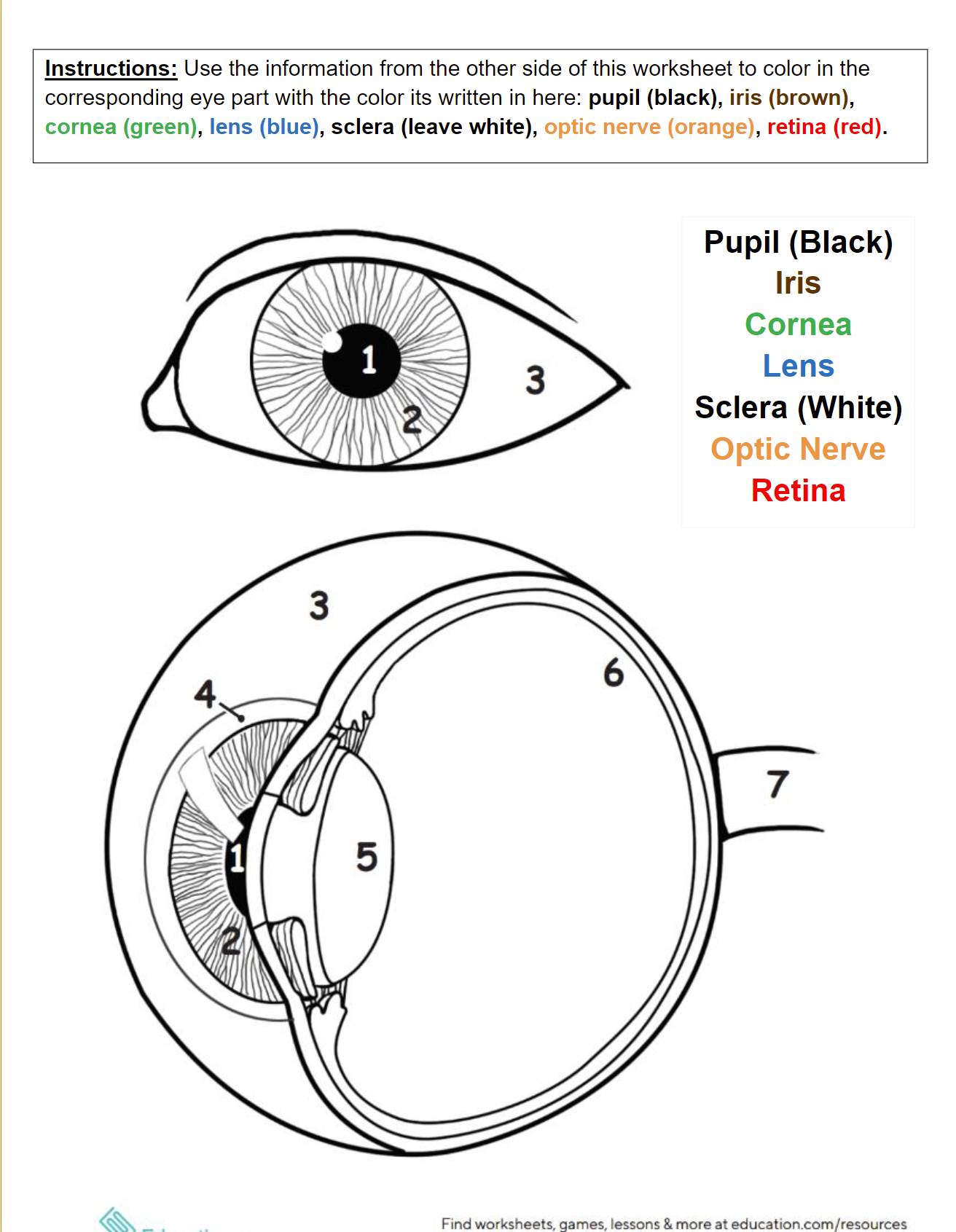
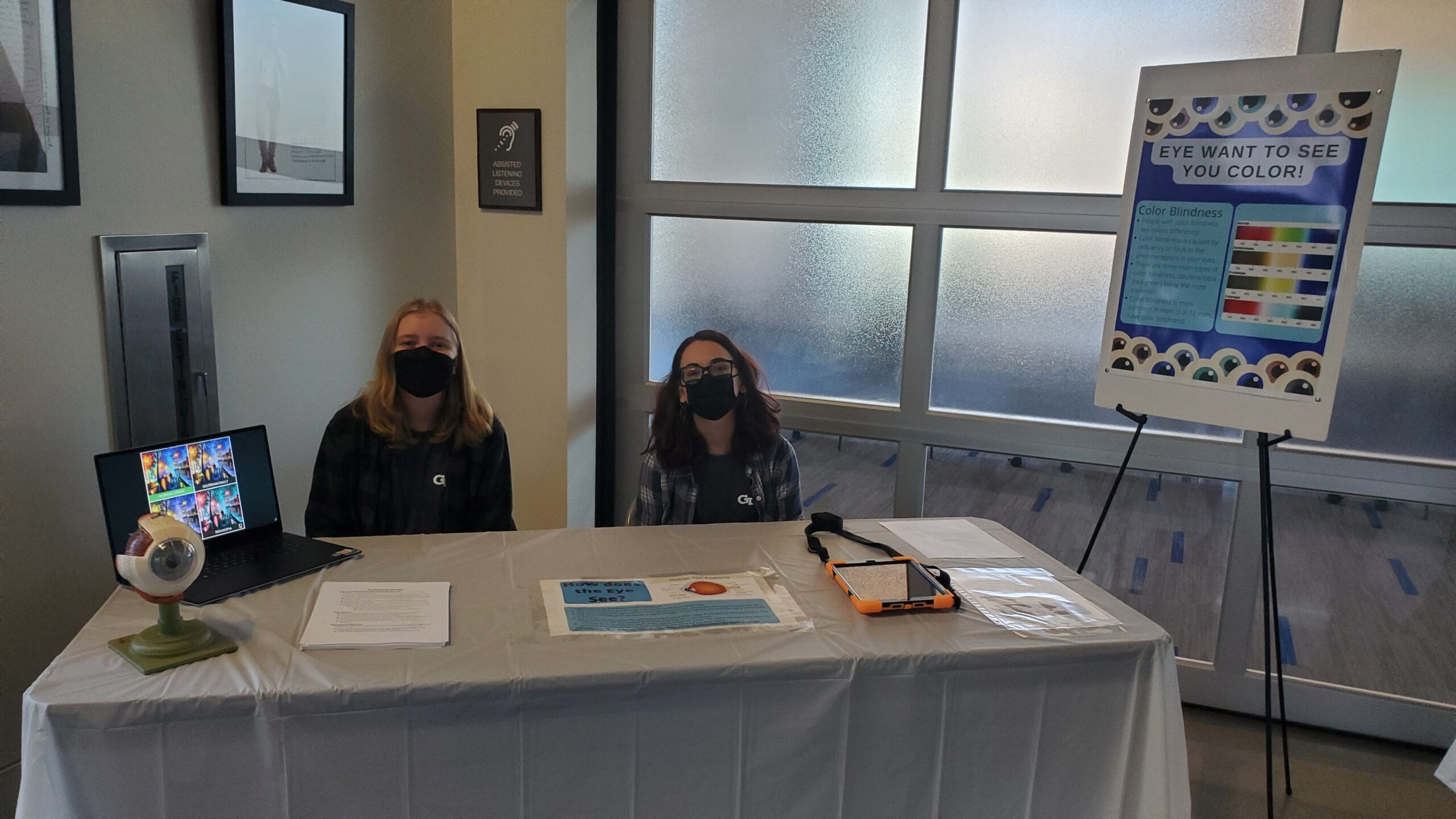
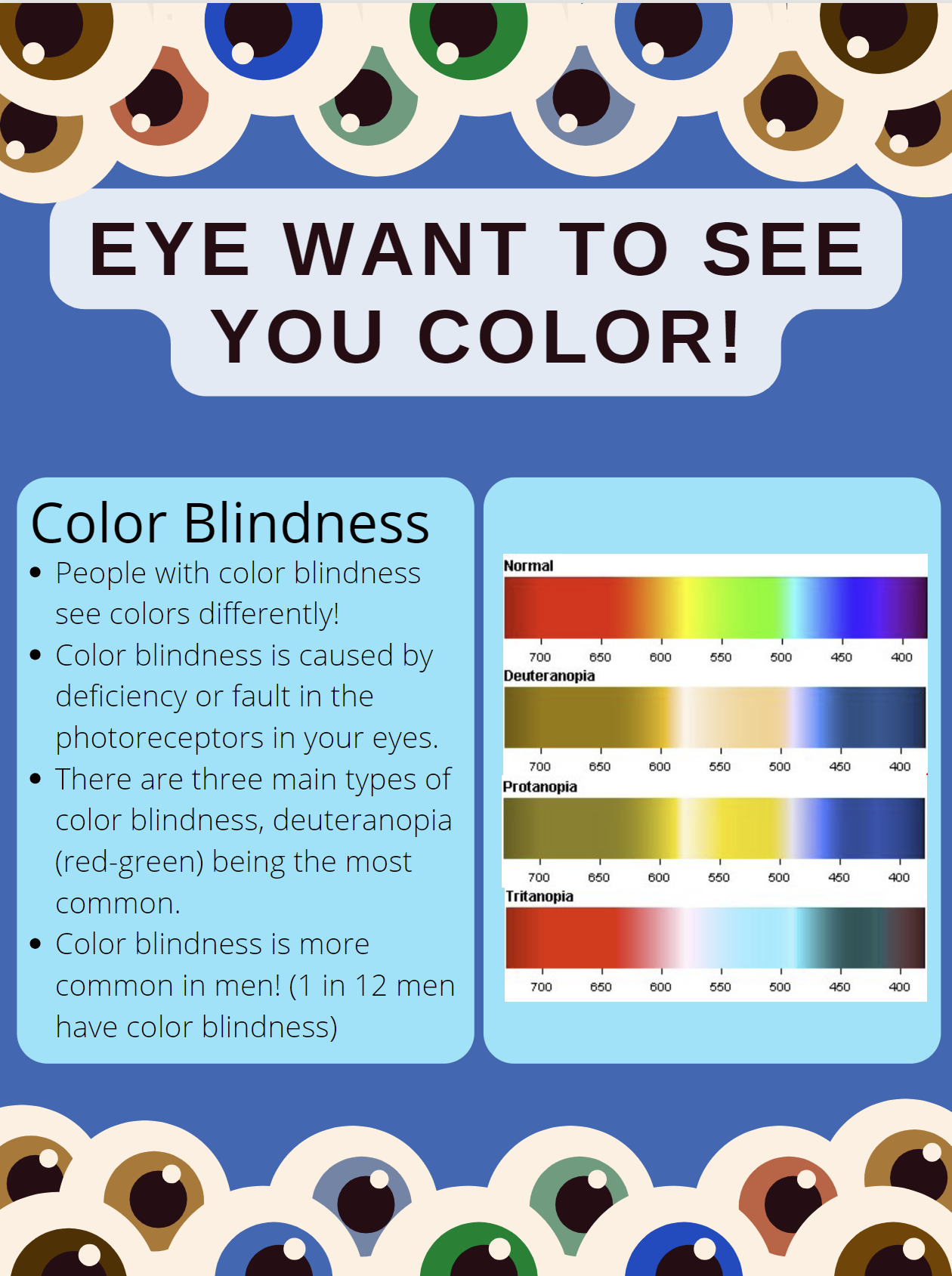
    Last month our STEMComm Team put together an event called MindCraft which focused on the science of arts and crafts. This involved setting up several tables, each of which was dedicated to a different craft. In order to create effective and engaging tables, each cohort also created materials such as posters and interactive worksheets. My table focused on the eye and how it works to perceive different colors while also relating it to color blindness. Below I include the poster, flyer, and interactive worksheet we created for this station along with tips and things to keep in mind when creating your own!
     

    • Poster 
      • Colorful 
        • It is important to create eye-catching materials so that people are drawn to your topic. (To read more about this, check out part 1 of this series where I give the top 5 tips to planning a STEM communications event!)
      • Not too wordy 
        • You do not want to overwhelm or bore your audience by making materials that are too wordy. Too many words will also draw the attention away from what you are saying as people will begin trying to read the content on the materials.
      • Images 
        • To aid in making your audience interested and also keeping them engaged while not taking the attention away from your presentation, include images! Choose images that reflect what you are presenting and act as an aid and supplement to your presentation. It could even be an image that you refer to in your oral speech so that you keep them engaged in what you are saying.
      • Neat 
        • It is also important to make sure that any material you are presenting is neat and organized so that your audience can take in the information effectively and efficiently. By doing this, you again are avoiding anything that takes away from your presentation. It also helps your audience be less confused about your topic so that you can answer engaging questions rather than clarification questions.
    • Flyer 
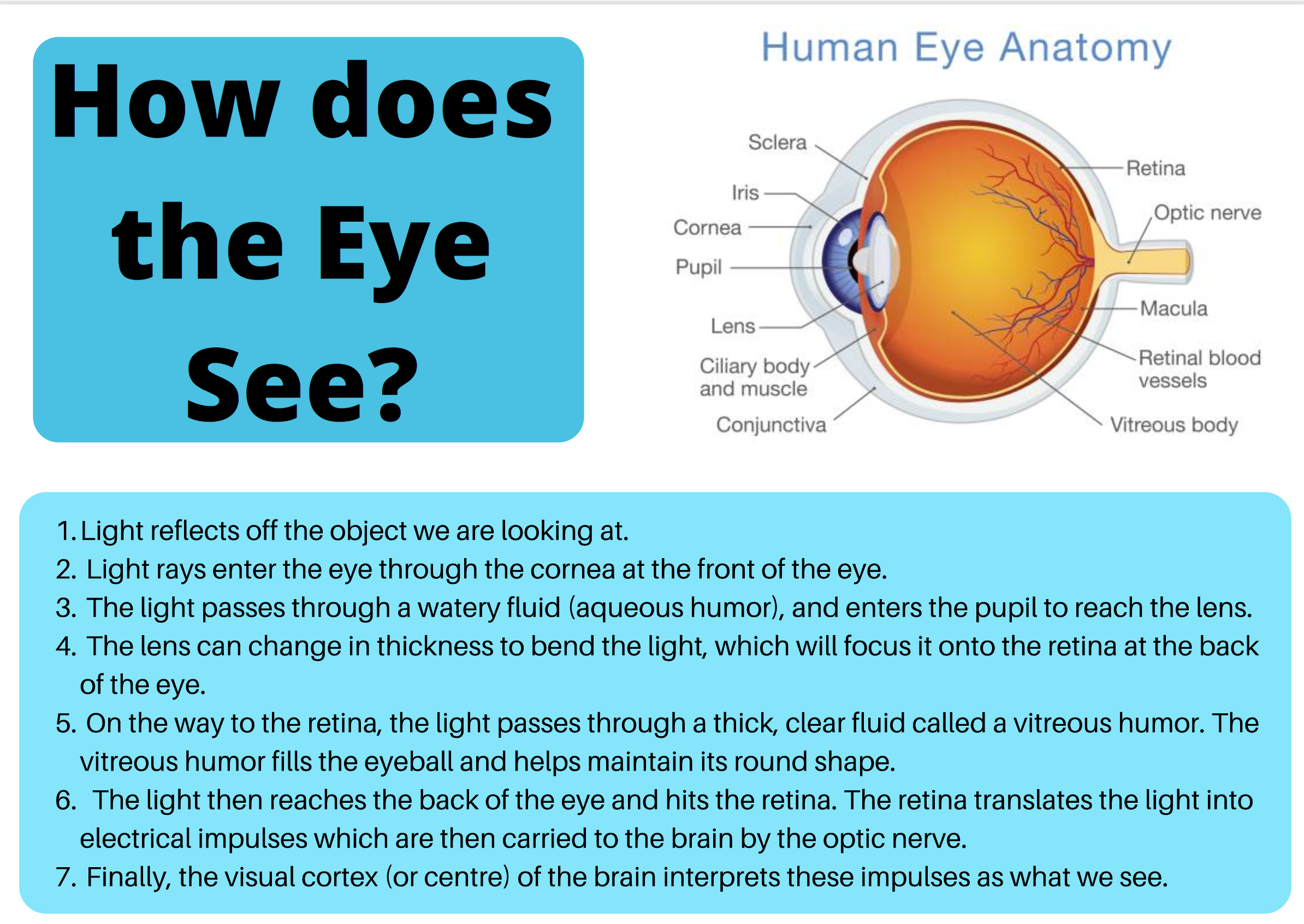
      • More detailed 
        • When presenting a smaller piece of material such as a flyer, you can include more detailed information than your large poster. This allows the audience members that are interested to look further into what you are presenting without overwhelming casual viewers.
      • Still includes images 
        • Despite having more details, you can see that including images is still important. By including this, you can more effectively present your concepts in a way that can easily be taken in by your audience.
      • Clearly labeled 
        • With this, it is imperative that if you include a diagram as we did, that it is all clearly labeled. If you do not, you risk confusing your audience and not having a clear understanding of the diagram so you cannot effectively speak on it. It is also important that you know how to speak on the parts of the diagrama and explain everything effectively (read more about rehearsing and being prepared in part 1).
    • Interactive Worksheet 
      • One side with supplemental information 
        • By providing supplemental information to your presentation in the format of a worksheet, you give the audience something they can take with them. This keeps them engaged with your topic past the time of your actual presentation and also allows them to continue learning.
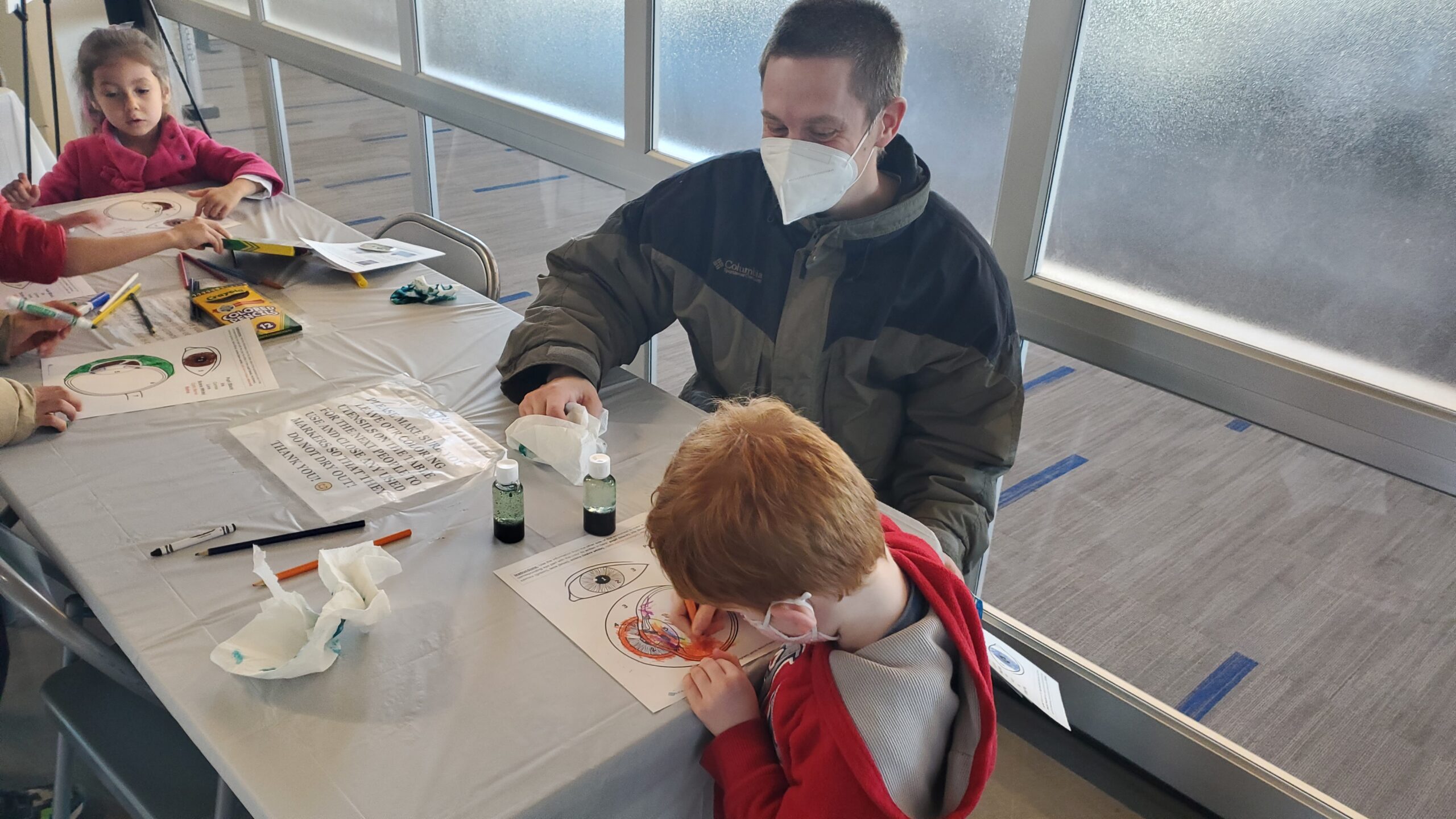
      • One side with fun coloring activity 
        • Interactive 
          • This provides something interactive for the audience to engage in that is fun. This again keeps them engaged and interested in your topic area.
        • Way for people to connect to the content presented 
          • Additionally, it provides a way for them to apply the information they learned from your presentation which is known to be one of the most effective learning strategies.

    Thank you for reading and best of luck to you on your future material creation and presentations!
  • Top 5 Tips to Planning a Science Outreach Event

    Top 5 Tips to Planning a Science Outreach Event

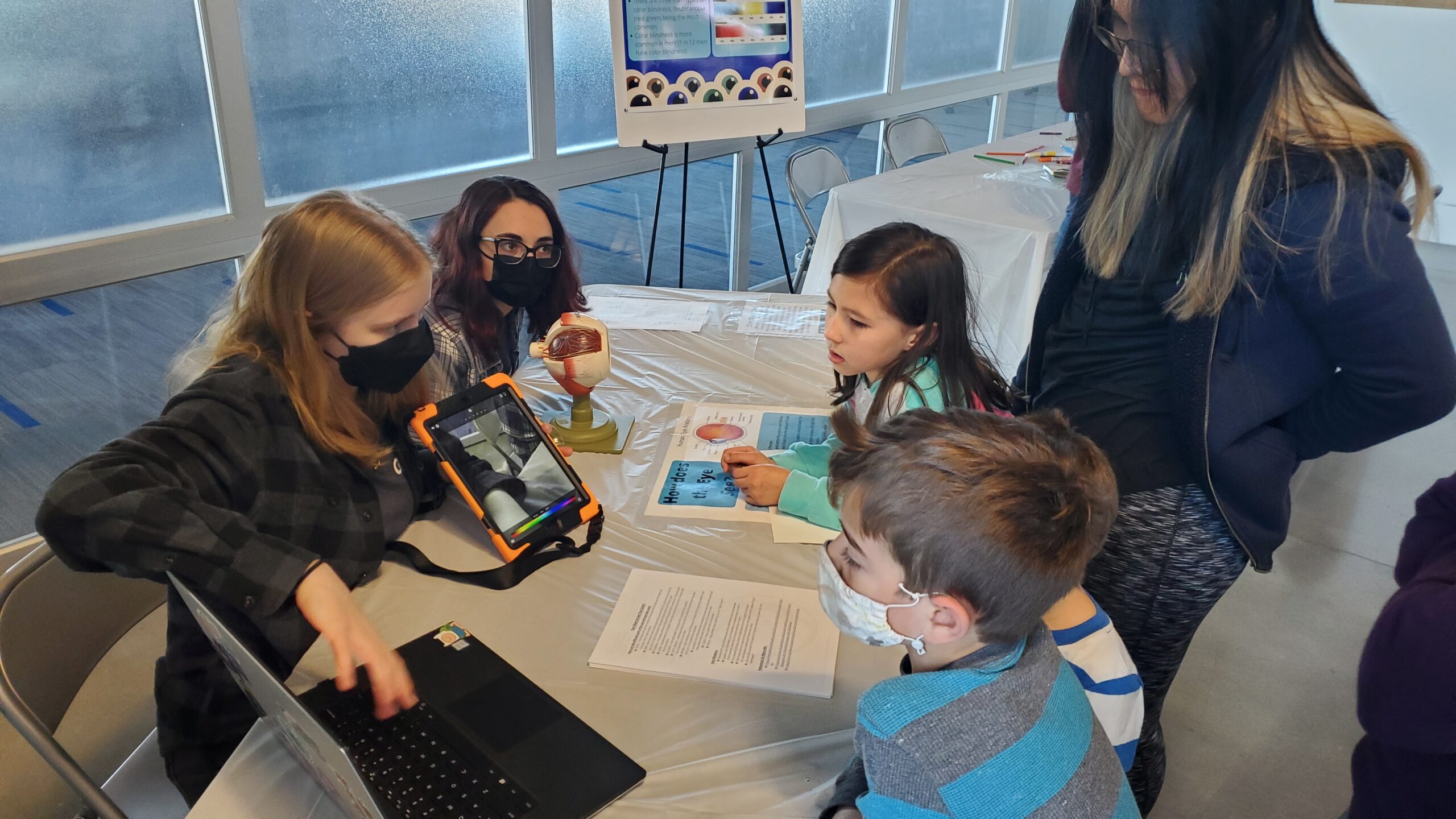
    A couple of weeks ago our STEMComm Team put together an event for the Atlanta Science Festival called MindCraft. Here we presented several tables with fun arts and crafts that tied into different scientific concepts. My cohort had a table dedicated to the eye and how it views different colors. After going through the process of planning and setting up our station, there were many things I learned. Here are my top 5 tips to planning a science communications event:

    1. Know your Audience 

    Being aware of who you will be presenting your content to is very important when considering what you will do. This involves asking yourself a series of questions such as, “How old will they be?”, “Are they new to these concepts?”, etc. By answering these questions, you will be able to cater your event to those specific needs and make it as effective as possible. For example, at our event, we knew that there would be some younger children in attendance so we made sure to have a station that they could more actively participate in by making our table’s craft a coloring sheet.

    2. Find an Expert Collaborator 

    By finding someone that has more expertise in the area than you, you will be able to not only add to your content, but also get assistance in the overall set-up. At our particular station, we did not have a collaborator and did everything on our own which became a bit more stressful. We quickly learned from some of the other tables that did have collaborators that the work became much easier with more people to split the labor between. In order to find a good collaborator, there are again some questions you should ask yourself – “Who would have knowledge in my topic area?”, “What organizations/people do I have access to?”, etc. By reaching out to an organization that could assist you, you will have people that you can manage so that you get your event set up more efficiently and with less stress on yourself. 

    3. Create Eye-catching Visuals 

    Striking visuals are another important component of an event. This draws people in initially and gives them something interesting to look at while they take in your content. At our table, this became particularly important since we were talking about colors. With posters and flyers, we were able to display important diagrams and color scales so people could visualize what we were explaining. It is also important to interact with these visuals by pointing or gesturing towards them as it keeps your audience engaged in what you are presenting. In addition, it gives those waiting on your presentation something to look at while you speak to other guests.

    4. Include Something Interactive 

    For an event such as these, interaction is key. By creating interaction between the audience and yourself as well as your content, people are more likely to learn something. For our particular table, we included an interactive coloring sheet that also included more information about the eye on the backside. This gave the guests something to physically do and apply the content to, plus, they were able to take it home with them! Having something to physically engage your audience with is important overall as it will keep them interested and help them apply and learn what you are presenting.

    5. Rehearse Beforehand

    When it comes to presenting information to others, it is important that you plan and rehearse what you will say in advance. If you do not do this, it is possible that you get stuck or do not present accurate information. In order to do this, you can set up some quick flashcards with information or use your presentation materials as guides. To rehearse, you can practice in the mirror, to your colleagues, or even to friends. This allows you to become comfortable with presenting the information and will make you sound more knowledgeable when you actually speak about it. However, you want to make sure that it does not sound like you are reading from a script as this could make your presentation boring. Rather, try to make it more casual and engage in conversations with your guests. Furthermore, you should be prepared for questions about your topic area. It is not the end of the world if you do not know how to answer something, but overall having done your research beforehand is important so that you are able to answer questions.

    All in all, many components go into planning and setting up a successful science communications event. By following these 5 tips, you can ensure better preparedness and less stress while planning.

    If you want to find out more about the specific materials and content we presented at our eyeball and color station, including tips on creating posters, flyers, and interactive worksheets, be on the lookout for another article coming soon! Best of luck with your event!

    More Resources for Planning a Science Outreach Event:

  • Seven Computer Science Jobs that Aren’t Coding Heavy!

    Seven Computer Science Jobs that Aren’t Coding Heavy!

                     Do not worry, you’re not alone! Graphic drawn by Devi Connor.

    Are you majoring in computer science or already have a degree in computer science, but find yourself not passionate about coding 8 hours a day for the rest of your career? Do you crave more other than software coding, such as using your people skills or artistic skills? Well, look no further! I have researched about 7 different jobs that you, as a major in computer science, can apply for that are not coding-heavy. This is definitely not an exhaustive list of all the jobs you can apply to as a computer science major that aren’t coding heavy, but it’s just enough to get you thinking of all the endless options out there! Tell your other computer science friends who also feel the same way as you do! Your options are never limited. Your skills are so versatile, take a look at some of the jobs below.

    1) Project Manager

    Do you like planning ahead and prefer to be a leader in group projects? A project manager job might just be what you’re looking for! Project managers plan, execute, and complete projects by overseeing team members (such as a group of computer scientists) to make sure that they are performing their duties sufficiently. Project managers formulate benchmarks and deadlines for their team to complete, and work to meet regulatory and company standards.

    • Average Annual Salary in U.S: $88,907


    2) IT Support Specialist 

    IT Support Specialists are responsible for responding to technical issues and they work with IT departments, computer manufacturers (such as Dell or Apple), and retail stores. They assist customers and employees with software, network, and hardware issues.

    • Average Annual Salary in U.S: $58,332


    3) Graphic Designer

    If you have a talent or passion for visual design, graphic designing might be for you! Graphic designers are responsible for using design software such as (e.g: Adobe Photoshop or GIMP) to create logos, images, and other visual representations for clients and various companies. You may be responsible for creating web page designs, logos, and flyers.

    • Average Annual Salary in U.S: $47,334


    4) Technical Recruiter

    Technical recruiters utilize their people skills to recruit, interview, and present potential employees for IT positions. Technical recruiters have strong communication and interviewing skills, and are knowledgeable of the fundamental responsibilities of certain IT positions that candidates may apply for. 

    • Average Annual Salary in U.S: $56,747


    5) Data Analyst

    Are you a detail-oriented person? Well, a data analyst might be the job for you! Data analysts analyze data sets and identify departmental trends. They use data software along with market research and statistic to report their findings and predications to shareholders and executives to help guide their decision-making.

    • Average Annual Salary in U.S: $70,353


    6) Technical Writers

    If you like writing, this job is suited for you! Technical writers are responsible for writing technical materials such as resource guides, user manuals, and publications. Technical writers must possess a deep knowledge of their industry, and must know certain writing guidelines, grammar, and spelling.

    • Average Annual Salary in U.S: $68,555


    7) Software Testing Engineer

    As a software test engineer, you will be responsible for creating the methodologies used for testing software programs and conducting automated and manual tests to find bugs and determine software output. You will run reports and analyze the testing results to make recommendations for improvements on the software.

    • Average Annual Salary in U.S: $ 87,110


    Sources:

    https://www.glassdoor.com/Salaries/index.htm 

    https://www.indeed.com/career-advice/finding-a-job/computer-science-jobs-without-coding